
Why You Should Consider These Modern Alternatives to Heptabase for Note Taking
Modern alternatives to Heptabase are gaining popularity as users look for better note-taking applications and Personal Knowledge Management (PKM) tools. Heptabase, known for its unique approach to managing knowledge, offers features like a split writing experience and bi-directional links, making it a popular choice among note-takers. These features make it easy to organize and find information, improving the overall user experience.
Among the modern alternatives, Constella.App excels with its infinite graph feature for quick thought capture and smart recall. Its innovative approach makes it a compelling alternative to Heptabase and traditional PKMs, offering enhanced workflow capabilities for users seeking a more efficient note-taking solution.
Understanding Heptabase
Heptabase Features revolutionize knowledge management through an innovative visual note-taking approach. By allowing users to organize information spatially, it facilitates a more intuitive understanding of complex ideas and connections.
- Split Writing Experience: Heptabase's unique split writing setup enhances productivity by enabling users to view multiple notes simultaneously. This feature supports seamless idea development and comparison, making it easier to synthesize information across different contexts.
- Bi-directional Links: A critical component of Heptabase is its use of bi-directional links. These links foster a dynamic network of ideas, where each note can reference others, creating an interconnected web of knowledge. This system ensures that information is not siloed but instead interwoven, reflecting the natural flow of thought processes.
Heptabase offers a distinct methodology for managing and organizing notes, making it a noteworthy tool in the realm of personal knowledge management (PKM). However, exploring a Heptabase alternative might reveal tools with enhanced features tailored to individual needs.
Limitations of Heptabase
- Heptabase drawbacks often revolve around its usability and user interface design. While the tool offers a unique approach to knowledge management, users have reported difficulties navigating the interface, which can feel unintuitive to those accustomed to more streamlined applications. The split writing experience, although beneficial for some workflows, may not suit everyone, leading to potential friction in daily use.
- Integration issues present another challenge for Heptabase users. Many modern professionals rely on seamless integration between their preferred tools and platforms. Heptabase's current limitations in this area can hinder those looking for a fully interconnected digital workspace. The lack of efficient synchronization with popular apps such as Google Drive or Slack might deter users who need robust collaborative environments.
- User feedback highlights several common challenges faced while using Heptabase. Complaints frequently mention a steep learning curve and a lack of customization options that some users find restrictive. These factors contribute to the perception that while innovative, Heptabase requires enhancements to meet the evolving needs of those seeking comprehensive note-taking solutions.
Modern Alternatives to Heptabase
Exploring modern alternatives to Heptabase allows users to find tools that offer improved features and usability. These alternatives cater to various needs, providing enhanced note-taking and knowledge management capabilities.
1. Constella.App
Constella.App emerges as a compelling choice among those seeking to compare knowledge management tools. It stands out with its unique approach to organizing thoughts and notes.
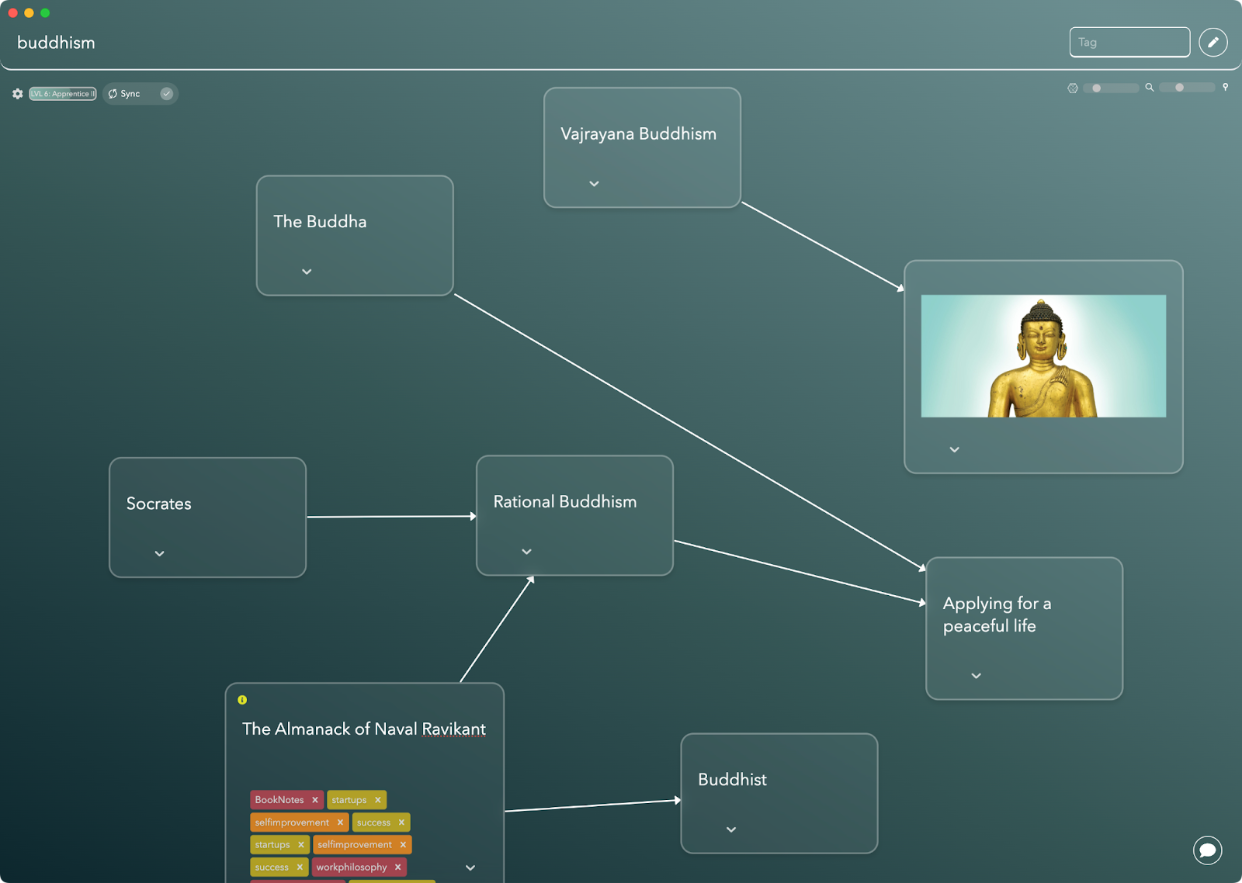
- Infinite Graph Feature: Constella's standout feature is its innovative infinite graph. This tool allows users to write down thoughts swiftly, ensuring they are remembered for future retrieval. When you type related ideas again, they appear automatically, streamlining note-taking and enhancing productivity.
- Enhanced Visual Organization: With an emphasis on visual organization, Constella offers a dynamic way to manage notes. Its graph-based interface aids in structuring information intuitively, making it easier to see relationships between concepts at a glance.
- Markdown Support and Extensive Linking: Users benefit from Markdown support for formatting notes efficiently. The platform also promotes extensive linking between notes, fostering a deeper understanding by connecting related ideas seamlessly.
Finding alternatives like Constella.App can significantly improve your note-taking experience. Its unique features make it a noteworthy consideration for those looking to optimize their workflow and enhance their knowledge management practices.
2. Miro
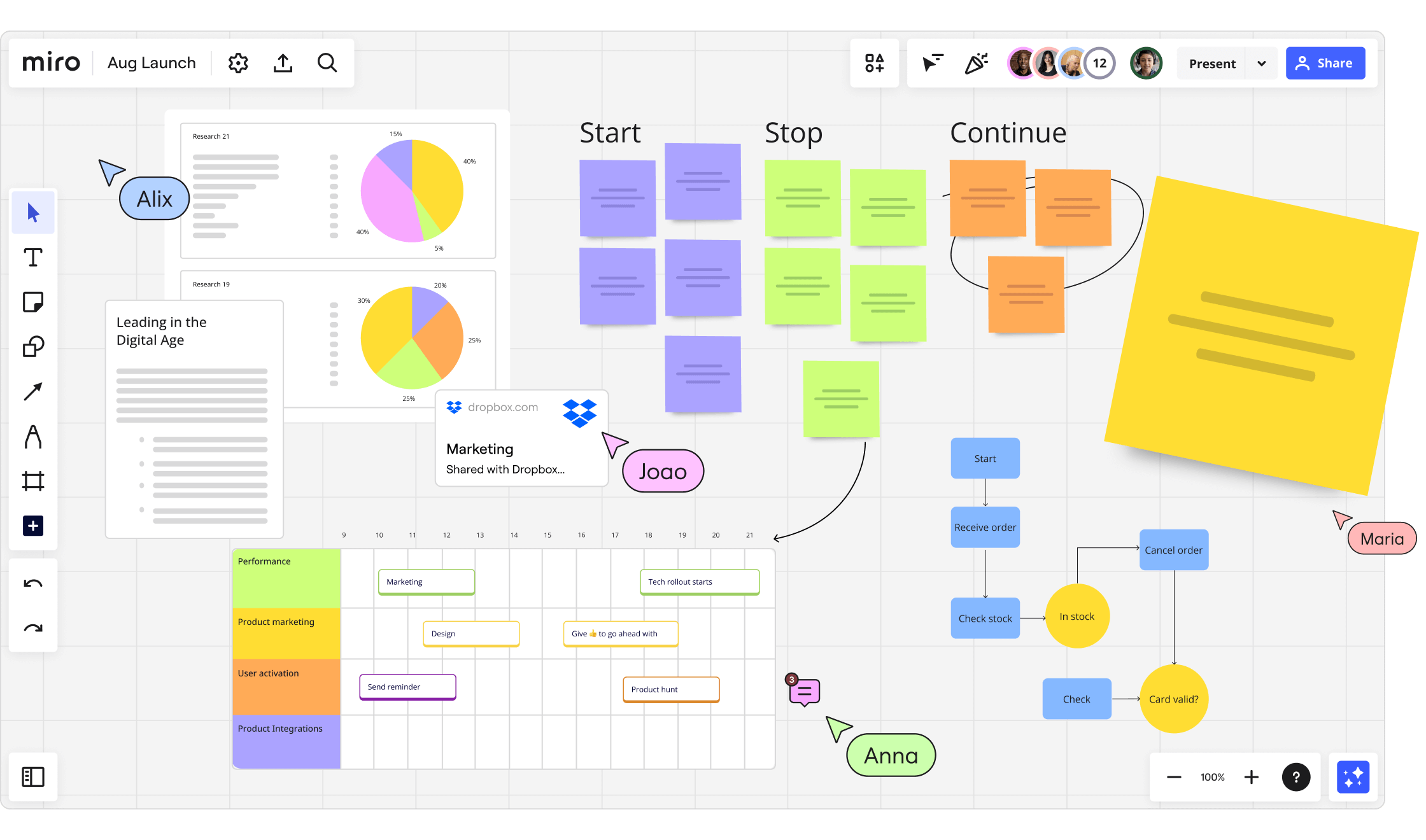
Miro stands out as a versatile workspace, particularly for those seeking to integrate note-taking with robust project management features. Unlike traditional note-taking applications, Miro offers a dynamic platform where users can plan, track, and manage tasks all in one place. This integration makes it an appealing choice for teams and individuals looking to streamline their workflows.
Key Features of Miro
- Comprehensive Project Management: Miro's tools allow users to create boards that facilitate brainstorming, mapping out ideas, and organizing information visually. These boards can be utilized for timelines, project tracking, or even strategic planning.
- Seamless Note Integration: The platform supports the inclusion of notes within its project management framework, enabling users to annotate projects or create standalone notes that relate directly to tasks. However, it's important to avoid common pitfalls in note-taking that could hinder productivity. Understanding the top 5 mistakes people make when note-taking can help users maximize their efficiency on platforms like Miro.
- Extensive Linking Capabilities: With features that support extensive linking between notes and tasks, Miro enhances knowledge management by allowing users to draw connections across different elements within their workspace.
Evaluating Note-Taking Tools
Choosing the right note-taking tool depends on your specific needs. While Obsidian is popular, some find it overrated. Several alternatives to Obsidian like Notion, Scrintal, and Supernotes offer unique features worth considering when looking for Heptabase alternatives.
By providing a comprehensive ecosystem of plugins and support for Markdown, Miro caters to diverse user requirements while ensuring an adaptable and productive environment.
3. Scrintal
Scrintal is another great choice when looking for modern alternatives to Heptabase. It is designed specifically for visual learners and offers features that set it apart from other note-taking apps.

Key Features of Scrintal
- User Interface & Usability: Scrintal has a user-friendly interface that makes it easy to navigate and use. This focus on design ensures that users can easily capture and organize their thoughts, making it a great choice for those who value intuitive design.
- Visual Learning Tools: Scrintal provides an environment where ideas can be mapped out visually, helping visual learners understand and remember better. This feature sets it apart from many other tools that mainly focus on text-based note taking.
- Markdown Support: Users benefit from native Markdown support, allowing seamless integration with other platforms and enhancing the flexibility of formatting notes.
When you compare knowledge management tools, Scrintal's approach to linking and contextual organization stands out. It supports extensive linking, enabling users to interconnect notes naturally. This aspect is crucial for those looking to find alternatives to Heptabase that offer robust linking capabilities.
While evaluating different note-taking tools based on individual needs, especially among categories like Obsidian, Notion, Evernote, and others, Scrintal's focus on visual structuring and user-friendly navigation makes it a compelling option for those in search of modern PKM solutions.
4. Supernotes
Supernotes offers a unique approach to note-taking with its notecard system. This format allows users to break down information into manageable, interconnected pieces, making it easier to organize and retrieve ideas. Each notecard can contain text, images, or links, providing a flexible space for capturing a wide range of content.

Markdown Support and Extensive Linking:
A standout feature of Supernotes is its Markdown support, which enables users to format notes easily while maintaining simplicity. The platform's ability to create extensive links between notecards distinguishes it as a powerful tool for knowledge management, allowing users to weave complex informational networks effortlessly.
Plugin Ecosystem and Modern Alternatives:
As part of the plugin ecosystem, Supernotes is comparable with other modern personal knowledge management (PKM) tools like Obsidian, Notion, and Joplin. This ecosystem offers users the flexibility to tailor their experience by integrating additional functionalities as needed. When individuals seek alternatives to Heptabase, evaluating different note-taking applications becomes crucial in finding the right fit for their needs.
Importance of Evaluating Tools Based on Individual Needs:
Choosing the right note-taking tool requires understanding one's specific requirements and preferences. Whether it's the visual organization offered by Milanote or the extensive linking capabilities of Roam Research, every tool provides unique features that cater to diverse user demands in the realm of note-taking and knowledge management.
Other Modern Apps
There are many modern alternatives to Heptabase that you can explore. These include a variety of note-taking applications and knowledge management tools. Each of these tools has its own unique features designed to meet different needs, so it's important to evaluate them carefully.
1. Microsoft OneNote
Microsoft OneNote stands out for its seamless integration with other Microsoft products, enhancing productivity through a unified digital ecosystem. It supports capturing notes across various formats, making it a versatile choice for users who require flexibility.
2. Milanote
Milanote is tailored for visual thinkers with its focus on visual brainstorming capabilities. Its canvas-style interface allows users to organize thoughts and ideas creatively, appealing particularly to designers and creative professionals.
3. Roam Research
Roam Research adopts a networked thought approach, facilitating intricate connections between notes for deeper learning. This tool is ideal for those who value extensive linking and the ability to create complex knowledge webs.
4. Joplin
Security-focused users may consider apps like Joplin, an open-source option emphasizing privacy and control over data. Its Markdown support ensures compatibility with various content types while maintaining security.
5. Google Keep
Quick capture enthusiasts might prefer Google Keep, renowned for its simplicity and speed in jotting down ideas on the go.
Choosing the right tool involves understanding these diverse offerings and aligning them with individual needs, ensuring that each user's note-taking experience is both effective and enjoyable.
Why Constella.App Stands Out as a Next Generation Tool
Constella.App Benefits offer a fresh perspective in personal knowledge management (PKM) tools. As a modern PKM solution, Constella.App provides users with distinctive features that enhance the note-taking experience.
1. Quick Thought Writing and Memory Recall
Constella.App allows for rapid jotting down of thoughts, ensuring that no idea is lost. The app's intelligent memory recall brings up relevant notes as you type, facilitating seamless integration of past insights into current work. This feature has been particularly beneficial for users struggling with forgetfulness, as detailed in this personal account where it significantly improved the author's ability to retain important information.
2. Beautiful Visual Graphs
The infinite graph feature presents an innovative way to organize thoughts visually. Users can easily create and navigate through complex networks of ideas, making the organization intuitive and visually appealing.
3. Jotting View Enhancements
This feature improves typing by providing contextual suggestions, streamlining the writing process and making it more efficient. The jotting view fosters a fluid interaction with your notes, adapting to your unique style.
4. Advanced Image and File Searching
Constella.App significantly upgrades traditional note-taking by incorporating robust search capabilities. Locating images and files within your notes becomes straightforward, enhancing accessibility and efficiency.
These features collectively position Constella.App as a standout tool in the ever-evolving landscape of digital note-taking applications.
Final Thoughts on Choosing the Right Note-Taking Application
When choosing a note-taking app, consider your personal needs. Each tool has unique features, so understanding your requirements is crucial. Whether you value visual organization, quick capture, or integration, knowing your priorities helps select the best PKM tool.
The right tool can boost productivity and knowledge management. Modern alternatives to Heptabase offer varied functions for different needs. Anytype is gaining popularity for its unique features. Consider potential drawbacks like limited features or poor interfaces. Careful evaluation ensures your chosen tool meets current needs and adapts to future changes. When creating a PKMS, avoid common pitfalls as outlined in setting up your PKMS.
FAQs (Frequently Asked Questions)
What is Heptabase and what are its key features?
Heptabase is a modern note-taking application that employs a unique approach to knowledge management. Its key features include visual note-taking, bi-directional links, and a split writing experience that enhances usability and organization.
What are the limitations of using Heptabase?
While Heptabase offers innovative features, it does have limitations such as challenges in user experience, integration issues with other tools, and feedback from users highlighting difficulties in navigating its interface.
What makes Constella.App a recommended alternative to Heptabase?
Constella.App stands out as a top recommendation due to its infinite graph feature that allows users to write thoughts quickly. It remembers these thoughts for future reference, providing contextual suggestions as you type.
How do modern alternatives like Miro and Scrintal compare to Heptabase?
Modern alternatives such as Miro offer robust project management features alongside note-taking capabilities, while Scrintal focuses on visual learners with live collaboration tools. Each tool caters to different user needs and preferences.
What should I consider when choosing a note-taking application?
When selecting a note-taking application, it's important to evaluate your personal needs regarding usability, integration capabilities, and specific features that enhance productivity and knowledge management.
Why is collaboration important in modern note-taking tools?
Collaboration is essential in modern work environments as it enhances teamwork and idea sharing. Many note-taking tools now incorporate collaborative features like shared whiteboards to facilitate this process.
Want more insights like this?
Subscribe to get short productivity tips and useful summaries of new tools every week.
Want more insights like this?
Subscribe to get short productivity tips and useful summaries of new tools every week.


