
Creativity is essential for effective problem-solving and driving innovation in various fields. To enhance creativity, effective brainstorming techniques are crucial as they allow individuals and teams to explore new perspectives and generate innovative ideas. The right tools can make this process even better by providing structured yet flexible environments for generating ideas.
Constella.App is a groundbreaking tool designed specifically to enhance creativity during brainstorming sessions. It stands out as one of the top mind mapping software and productivity apps available, offering unique features that aim to turn creative sparks into actionable plans.
The Power of Personal Knowledge Management (PKM) in Idea Generation
 Personal Knowledge Management (PKM) plays a crucial role in organizing and managing thoughts, thereby facilitating more productive brainstorming sessions. At its core, PKM involves the collection, classification, storage, retrieval, and sharing of personal knowledge. This process transforms scattered thoughts into structured insights, allowing individuals to tap into their creativity efficiently.
Effective PKM Strategies with Constella.App
Constella.App offers several strategies to enhance PKM:
- Interconnected Notes: By creating a network of interconnected notes, users can seamlessly navigate between related ideas. This approach encourages the discovery of new connections and fosters an environment where innovative solutions can emerge.
- Utilizing Tags: Tags are powerful tools within Constella.App that simplify the retrieval of information. By assigning relevant tags to notes, users can quickly access specific ideas without sifting through unrelated content.
These strategies streamline the brainstorming process by ensuring that all necessary information is easily accessible and well-organized. Constella.App's focus on visual connections and efficient data management makes it an ideal tool for those looking to harness the full potential of their creative capabilities.
As we look towards the future, it's clear that the landscape of Personal Knowledge Management tools will continue to evolve. However, while setting up your PKM system, it's essential to avoid common pitfalls. Here are seven mistakes you should steer clear of to ensure an effective implementation of your Personal Knowledge Management System (PKMS).
Exploring the Key Features of Constella.App
Constella.App stands out as a powerful tool for enhancing creativity during brainstorming sessions. Its unique features provide users with innovative methods to organize and expand their ideas effectively. Let's delve into the standout features that make Constella.App an invaluable resource for creative thinkers.
Visual Mind Mapping
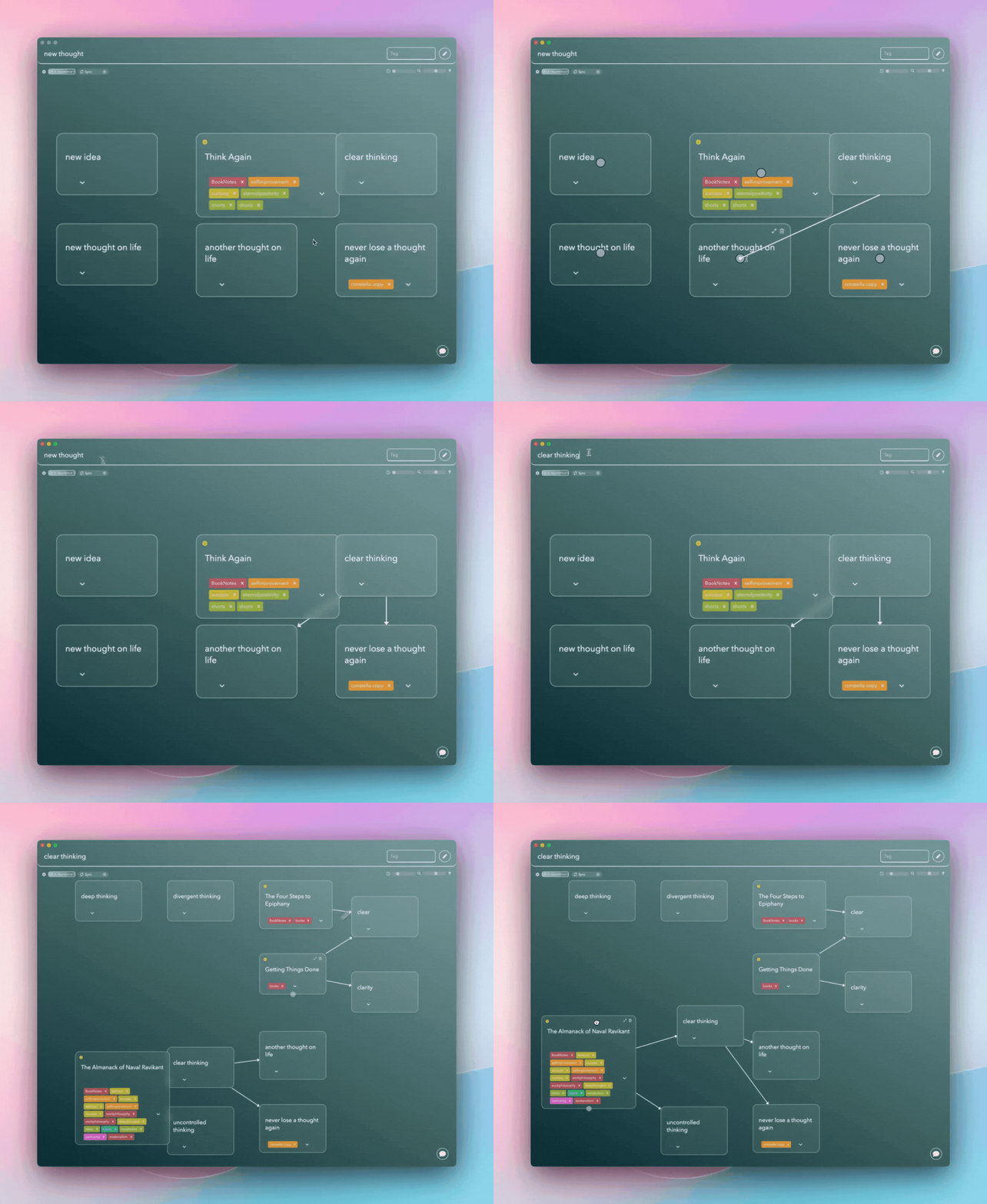
With its visual mind mapping capabilities, Constella.App transforms abstract thoughts into concrete visuals. This feature allows users to build interactive visuals, which facilitate idea exploration and organization. By creating a visual representation of concepts, users can see connections between ideas that might not be apparent in a linear list format. This method enhances understanding and aids in structuring complex information, making it easier to generate actionable outcomes from brainstorming sessions. Mind mapping is a powerful technique that visually organizes information, enhancing creative thinking and brainstorming.
Networked Connections
Constella.App excels in forming networked connections between ideas. Unlike traditional note-taking tools, it links concepts visually, which not only organizes information but also enhances memory recall. By viewing how ideas interlink, users can uncover patterns and relationships, promoting innovative thinking. This approach supports divergent thinking—essential for unlocking fresh perspectives during brainstorming.
AI-Powered Insights
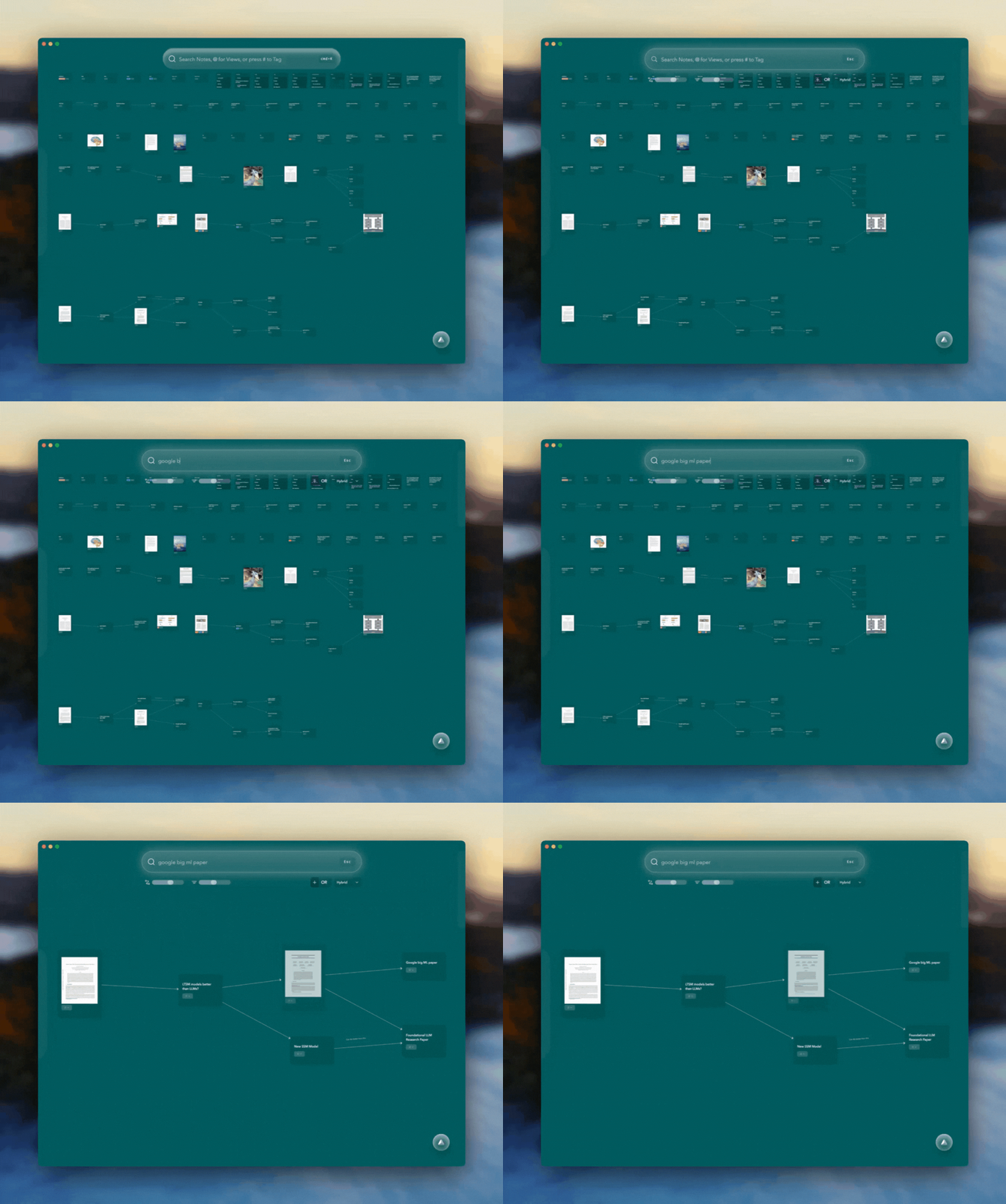
Harnessing AI-powered features, Constella.App provides valuable prompts and suggestions throughout the brainstorming process. These insights help users overcome creative blocks by offering new angles and possibilities based on existing data inputs. The artificial intelligence acts as a virtual collaborator, nudging users towards unexplored territories of thought, thereby amplifying the creative potential of each session. AI-powered note-taking is changing the way we work, making us more productive.
Cross-Platform Syncing
The convenience offered by cross-platform syncing ensures that users can access their thoughts and ideas from any device at any time. Whether you start your brainstorming session on a desktop or continue it on a mobile device, Constella.App keeps your work seamless and uninterrupted. This flexibility supports continuous creativity by allowing you to capture fleeting ideas whenever inspiration strikes.
By leveraging these features—visual mind mapping, networked connections, AI-powered insights, and cross-platform syncing—Constella.App positions itself as more than just a productivity app; it's an essential tool for those looking to enhance their brainstorming capabilities and foster innovative thinking across diverse contexts
Using Visual Note-Taking Tools to Improve Brainstorming
Visual note-taking tools are essential for improving understanding and memory retention. During brainstorming sessions, these tools turn abstract ideas into concrete visuals, making them easier to understand and remember. By visualizing complex concepts, individuals can simplify information processing, leading to more productive brainstorming sessions.

- Memory Retention: Visual elements such as diagrams, charts, and mind maps engage different parts of the brain compared to traditional text-based notes. This engagement aids in memory retention by creating stronger mental associations.
- Comprehension: With visual note-taking, complicated ideas become more accessible. This method allows users to break down intricate thoughts into manageable pieces, facilitating a deeper understanding during brainstorming.
However, it's essential to avoid common mistakes in the note-taking process. For instance, the top 5 mistakes people make when note-taking can significantly hinder the effectiveness of visual note-taking.
The Role of Visual Tools in Enhancing Research Capabilities
Exploring the role of visual tools in enhancing research capabilities reveals their ability to connect diverse sources of information seamlessly. By visually linking data points from various research materials, individuals can uncover patterns and insights that might remain hidden in linear text formats. Visual note-taking aids in synthesizing information across multiple domains. It allows for a holistic view of data connections, promoting innovative thinking and novel solutions.
Incorporating visual note-taking strategies not only boosts individual creativity but also transforms how teams brainstorm and generate ideas. These tools turn chaotic streams of consciousness into organized frameworks that drive effective problem-solving.
Effective Strategies for Maximizing Your Brainstorming Experience with Constella.App
Setting Up Your Workspace
Creating a digital environment that sparks creativity is essential. Constella.App offers customizable options to organize your workspace effectively:
- Personalized Layouts: Arrange your dashboard and note structures to reflect your thinking process. Customizable layouts can help align visual elements with how you naturally generate ideas.
- Tagging System: Use tags to categorize ideas, making it easier to retrieve them later. This feature assists in maintaining a clutter-free workspace, allowing focus on the most relevant concepts.
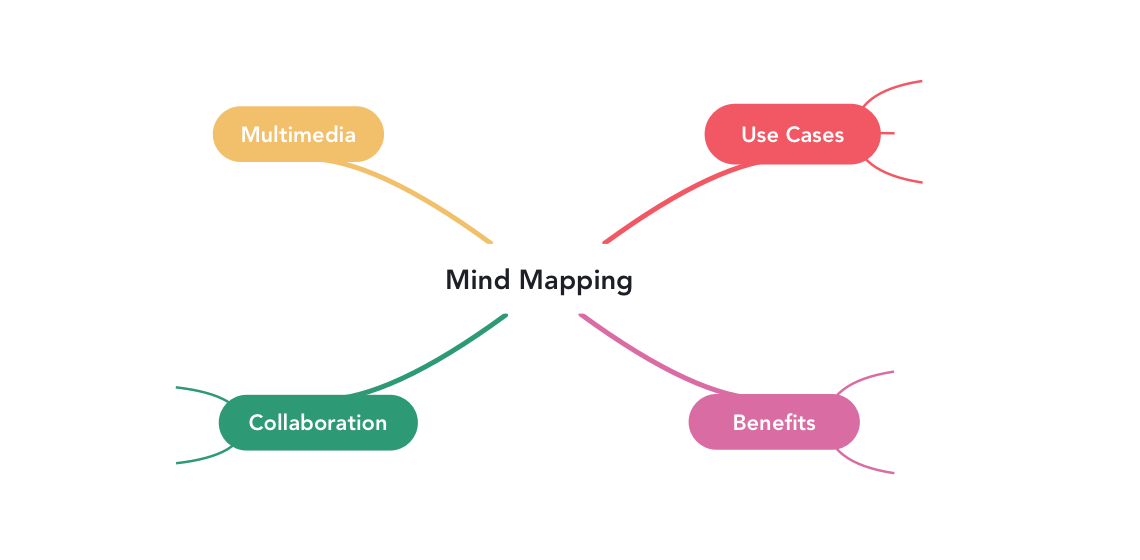
Mind maps are a staple of brainstorming, and Constella.App elevates this technique by automating the connections between nodes.
Step-by-Step:
- Start with a central node representing your main problem or goal.
- Add branches for related sub-ideas, solutions, or challenges.
- Use the app’s linking feature to draw connections between related nodes.
**Example: **A project manager brainstorming for a marketing campaign might start with “Campaign Theme” as the central node, branching out into “Target Audience,” “Platform Strategies,” and “Budget.” Links between nodes like “Target Audience” and “Platform Strategies” can reveal critical insights about where to focus efforts.
Utilizing AI Features for Idea Generation
Constella.App leverages artificial intelligence to boost brainstorming by offering intelligent insights:
- Prompt Suggestions: The app provides AI-generated prompts based on your input, nudging you towards unexplored avenues of thought.
- Trend Analysis: Stay ahead by utilizing trend analysis features that identify emerging patterns relevant to your field of interest. This helps in aligning your ideas with current innovations.
Harness these strategies to make the most out of your brainstorming efforts with Constella.App, transforming initial thoughts into viable plans through structured collaboration and innovative features.
Constella.App in Action: Real-Life Use Cases
- **Creative Writing: **Authors and screenwriters can map out plot points, character arcs, and world-building elements in an interconnected visual space. This method keeps all narrative elements accessible and consistent, reducing the risk of plot holes.
- **Business Ideation: **Entrepreneurs can brainstorm business models, product features, and marketing strategies. For instance, a startup founder might map out a Minimum Viable Product (MVP), linking customer pain points to potential solutions and revenue streams.
- **Event Planning: **Event coordinators can streamline planning by visualizing logistics, schedules, and vendor details in one graph. This approach reduces oversight and simplifies complex tasks.
- **Academic Research: **Researchers can structure literature reviews, hypothesis testing, and data analysis visually, identifying connections across disciplines or studies.
Conclusion
Unlocking creativity with technology like Constella.App offers new dimensions in brainstorming. By integrating advanced features, this app transforms how we approach idea generation and problem-solving. Its capabilities not only streamline the creative process but enhance it, making the transition from abstract thoughts to actionable plans seamless.
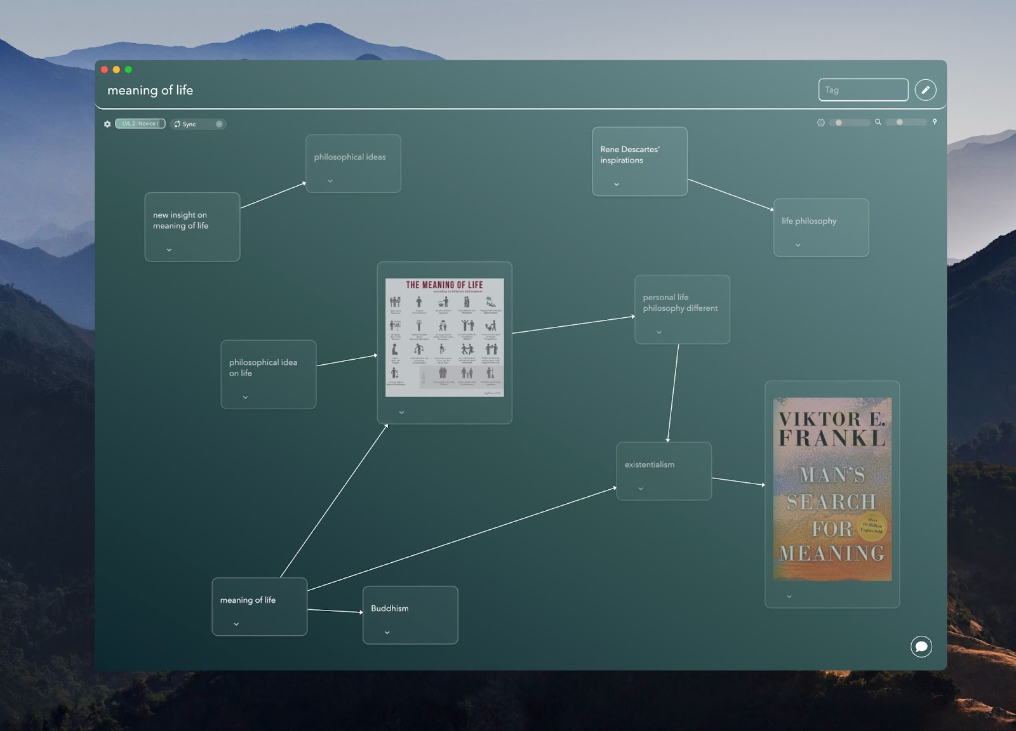
Venturing into Constella.App reveals a next-generation tool for personal knowledge management. Key features such as the infinite graph structure and fast thought capture capability set it apart from conventional tools. These elements facilitate a more dynamic interaction with ideas, allowing users to visualize connections and foster innovation effectively.
Engaging with Constella.App is an invitation to rethink traditional brainstorming methods. This app stands as a testament to how digital innovation can elevate creative processes, offering users a robust platform for capturing and cultivating ideas. Whether you're working solo or collaborating with a team, exploring Constella.App could unlock unprecedented levels of creativity and productivity in your brainstorming endeavors.
FAQs (Frequently Asked Questions)
What is Constella.App and how does it enhance brainstorming?
Constella.App is a revolutionary tool designed to boost brainstorming sessions by facilitating creativity through effective personal knowledge management. It offers visual mind mapping capabilities, AI-powered insights, and cross-platform syncing, all of which help users organize their thoughts and generate innovative ideas more effectively.
How can Personal Knowledge Management (PKM) strategies improve idea generation?
PKM strategies play a crucial role in organizing thoughts for productive brainstorming. By using tools like Constella.App, users can create interconnected notes and utilize tags for easy retrieval, which enhances clarity and fosters a more efficient idea generation process.
What are the standout features of Constella.App?
Key features of Constella.App include visual mind mapping for idea exploration, networked connections that enhance memory retention, AI-powered insights providing valuable prompts during brainstorming, and cross-platform syncing that allows users to access their ideas from any device.
How does Constella.App compare to other popular PKM tools like Obsidian and Notion?
Constella.App differentiates itself from tools like Obsidian and Notion by offering unique visual thinking advantages. While Obsidian focuses on linking notes textually, Constella.App emphasizes visual mind mapping. In contrast to Notion's note-taking capabilities, Constella.App enhances creative brainstorming through its interactive visuals and AI features.
What are the benefits of using visual note-taking tools during brainstorming sessions?
Visual note-taking tools significantly aid in comprehension and memory retention, making them invaluable during brainstorming. They facilitate connections between diverse sources of information, enhancing research capabilities and allowing for a more integrated understanding of ideas.
What strategies can be employed to maximize the brainstorming experience with Constella.App?
To maximize your brainstorming experience with Constella.App, consider setting up your digital workspace for optimal organization, utilizing AI features for generating ideas, and collaborating with teams through the Smart Spaces feature to foster collective creativity.
Want more insights like this?
Subscribe to get short productivity tips and useful summaries of new tools every week.
Want more insights like this?
Subscribe to get short productivity tips and useful summaries of new tools every week.


