
Constella or Capacities: The Best Choice for Efficient Note-Taking and Life Management

Capacities.io is a modern note-taking application that stands out among the many personal knowledge management (PKM) tools available today. In our fast-paced world, being able to efficiently manage and organize information is more important than ever. When your life is well-organized, you can be more productive by clearing your mind of unnecessary distractions and focusing on what truly matters.
As we explore Personal Knowledge Management, Capacities.io stands out as a powerful tool for streamlining information management. Its intuitive platform combines simplicity with strong organizational features, enabling users to manage large data volumes easily. Through its modular approach, it allows structuring of notes using blocks and entities for seamless categorization and idea linkage.
Key Features of Capacities.io That Make It Stand Out
Capacities.io offers a unique blend of simplicity and powerful features that cater to the needs of users seeking effective personal knowledge management. Designed to organize your life with Capacities, this tool stands out in several ways from other PKM tools available today.
Unique Features of Capacities.io
- Modular Structure: Allows seamless categorization and linking of ideas through blocks and entities, simplifying information management.
- User-Friendly Interface: Intuitive design for easy navigation, suitable for all PKM users.
Collections and Tags for Enhanced Organization
- Collections: Group related notes for coherent structure and quick retrieval.
- Tags: Enable cross-referencing and multiple access pathways by applying multiple tags to notes.
Powerful Search Functionality
- Advanced Search Options: Filter results based on specific criteria for prompt access to relevant information.
- Speed and Precision: Optimized search function for fast, accurate retrieval from extensive note libraries.
Embracing these features enables users to take full advantage of what Capacities.io has to offer. By implementing collections, tags, and leveraging the powerful search functionality, users can maintain a highly organized digital workspace tailored to their personal or professional needs.
Visualizing Information with Capacities: The Power of Diagrams
Visual aids improve understanding and memory by presenting complex ideas clearly. Diagrams provide structure, reveal patterns, and simplify data for quick concept grasping. Capacities.io integrates diagrams into its platform, allowing users to enhance learning by embedding visuals directly into notes without workflow disruption.

- Diagram Integration: Capacities allows users to create and integrate diagrams effortlessly. These visuals can be customized to suit individual needs, aiding in the clarification of complex thoughts.
- User-Friendly Interface: The interface supports easy navigation and manipulation of diagrams, ensuring that even those unfamiliar with diagramming can utilize this feature effectively.
Capacities' visual information management enhances clarity and efficiency, integrating diagrams to boost productivity and enrich user experience through improved comprehension and memory retention. This is particularly evident in how mind mapping, a technique that visually organizes information, is utilized within the platform. By creating interconnected branches and sub-branches, mind maps help users see relationships between concepts, thus enhancing creative thinking and brainstorming.
Comparing Capacities with Other Popular PKM Tools
When evaluating the features of Capacities alongside popular PKM tools like Notion and Obsidian, several distinguishing factors emerge that can guide users in choosing the right tool for their needs.
Organizational Capabilities
- Capacities: Offers a modular structure using blocks and entities, allowing users to categorize and link ideas seamlessly. This approach facilitates a granular level of organization that is both flexible and intuitive.
- Notion: Known for its versatile databases and templates, Notion excels in creating a highly customizable workspace. Users can craft everything from simple to-do lists to complex project management systems.
- Obsidian: Utilizes a graph-based view to visualize connections between notes, making it ideal for users who prefer linking ideas in a non-linear fashion. Its emphasis on backlinking provides a robust way to map out knowledge networks.
Ease of Use
- Capacities: Prioritizes simplicity without sacrificing depth. Its user-friendly interface makes it accessible for those new to PKM tools while offering advanced features for experienced users.
- Notion: Offers extensive customization options but comes with a steeper learning curve due to its vast array of features. Users may need time to fully leverage its capabilities.
- Obsidian: Focuses on markdown files and local storage, appealing to tech-savvy users who appreciate control over their data but may be less intuitive for beginners.
Overall User Experience
- Capacities: Strikes a balance between functionality and usability, providing an experience that is both engaging and efficient.
- Notion: Delivers a polished user experience with rich multimedia support but can become overwhelming due to its complexity.
- Obsidian: Offers high customization and control, suitable for advanced users seeking a personalized PKM environment.
Leveraging AI for Enhanced Note-Taking and Organization in PKM Tools
The integration of AI in PKM tools has become a transformative for how users capture, organize, and retrieve information. Capacities.io leverages this technology to enhance note-taking by automating routine tasks and offering intelligent suggestions that streamline the user's workflow.

Key Features of AI Integration in Capacities
- Automated Organization: AI assists in categorizing notes based on content, reducing manual effort. By identifying patterns and connections between different pieces of information, AI helps users organize their life more efficiently within Capacities.
- Smart Search Capabilities: Capacities employs AI-driven search functionalities that go beyond simple keyword matching. Users can find relevant information through contextual understanding, making the retrieval process faster and more intuitive.
- Predictive Text and Recommendations: Through machine learning algorithms, Capacities provides predictive text features and content recommendations. These tools anticipate user needs, enabling smoother note-taking experiences.
As the landscape of personal knowledge management evolves, AI integration continues to be a key differentiator among tools like Capacities. Whether for personal or professional use, these advances are essential for those seeking to maximize productivity while minimizing cognitive load.
Avoiding Common Pitfalls in Note-Taking
However, it's important to avoid common pitfalls in note-taking that can hinder productivity. Understanding the top mistakes people make when note-taking can help users leverage these advanced features more effectively.
While apps like Obsidian have gained popularity due to their unique features and flexibility in note-taking, it’s worth exploring whether these productivity apps truly outperform others in the market. There are also several alternatives to Obsidian that users should consider which might better suit their specific needs.
Tips for Effective Information Organization Using Capacities.io
Tips for effective information organization with Capacities revolve around using its unique features to streamline your digital workspace. Here are some best practices to consider:
Structuring Your Notes Effectively
- Utilize Collections and Tags: Organize notes into collections for broader categories and use tags to link related ideas across different notes, creating a cohesive structure.
- Leverage Blocks and Entities: Break down complex ideas into manageable blocks. Use entities to categorize these blocks, connecting related thoughts seamlessly.
- Regularly Update and Review: Periodically revisit and revise notes to prevent outdated or irrelevant information from cluttering your system.
Maintaining a Clutter-Free Digital Workspace
- Adopt Minimalism: Capture only essential information to avoid confusion and disorganization.
- Consistent Naming Convention: Use a naming pattern for notes, collections, and tags to aid quick retrieval.
- Strategic Search Use: Regularly refine search queries to efficiently pull relevant data.
By integrating these strategies, users can significantly enhance their productivity while ensuring their knowledge base remains organized and efficient. As you continue exploring Capacities, these tips will serve as a foundation for building a more structured and accessible digital repository.
However, if you find yourself struggling with forgetfulness despite implementing these strategies, it may be worth exploring additional tools like the Constella app, which has proven beneficial for many in overcoming such challenges.
Building Your Second Brain with Capacities: A Step-by-Step Guide
Imagine having a second brain that effortlessly organizes and recalls information at your command. Capacities.io makes this vision possible through its robust features designed to manage your knowledge intuitively. Here's a step-by-step guide on how to organize life with Capacities by building a personalized second brain system.
Step 1: Define Your Goals

Understanding what you want from your second brain is crucial. Are you focusing on professional projects, personal growth, or both? Defining clear goals helps in shaping the structure within Capacities.
Step 2: Set Up Collections
Use collections to categorize broad topics like "Work Projects", "Personal Development", or "Learning Resources". Enhance organization by tagging entries with relevant keywords, allowing for easy retrieval and cross-referencing.

- Create collections: Use collections to categorize broad topics like "Work Projects", "Personal Development", or "Learning Resources".
- Utilize tags: Enhance organization by tagging entries with relevant keywords, allowing for easy retrieval and cross-referencing.
Step 3: Modular Note-Taking
Capacities allows for modular note-taking, breaking down information into blocks and entities.
Divide notes into manageable chunks, each focusing on a specific idea or task. Connect related ideas across different notes using internal linking features, creating a network of interconnected thoughts.

- Use blocks: Divide notes into manageable chunks, each focusing on a specific idea or task.
- Link entities: Connect related ideas across different notes using internal linking features, creating a network of interconnected thoughts.
Step 4: Visual Diagrams Integration
Integrate visual aids to enhance comprehension and retention.
Utilize Capacities' diagram tools to visualize complex information, making patterns and relationships clearer.

- Diagram your thoughts: Utilize Capacities' diagram tools to visualize complex information, making patterns and relationships clearer.
Step 5: Employ Powerful Search Functionality
The search functionality is vital in managing extensive information efficiently. Use it to quickly locate specific blocks or entities within your collections.
Challenges Users May Face When Using Capacities.io For Their Organizational Needs
Navigating any new tool can present challenges, and Capacities.io is no exception. Individuals seeking to organize your life with Capacities might encounter a few hurdles:
- **Learning Curve: **New users may find the initial setup of Capacities.io overwhelming due to its robust features, requiring time to learn effective organization methods.
- **Customization Limitations: **Capacities offers categorization and linking but may not satisfy those seeking extreme customization or personalized workflows.
- **Integration with Other Tools: **Integrating Capacities.io with existing tools can be challenging, as seamless compatibility isn't always guaranteed.
- **Cost Considerations: **The free version may have feature restrictions or storage limits, affecting heavy users needing extensive capacity.
Understanding these potential issues can help users better incorporate Capacities.io into their routines.
Conclusion: Exploring Other Tools Beyond Capacities.io for Comprehensive PKM Solutions Like Constella.App
Looking for different tools to boost your personal knowledge management? Check out Constella.App! It's not like the usual PKM tools. With its cool infinite graph setup, you can jot down your thoughts quickly, and the app keeps them handy for later. It's perfect if you want to grab and remember info easily.
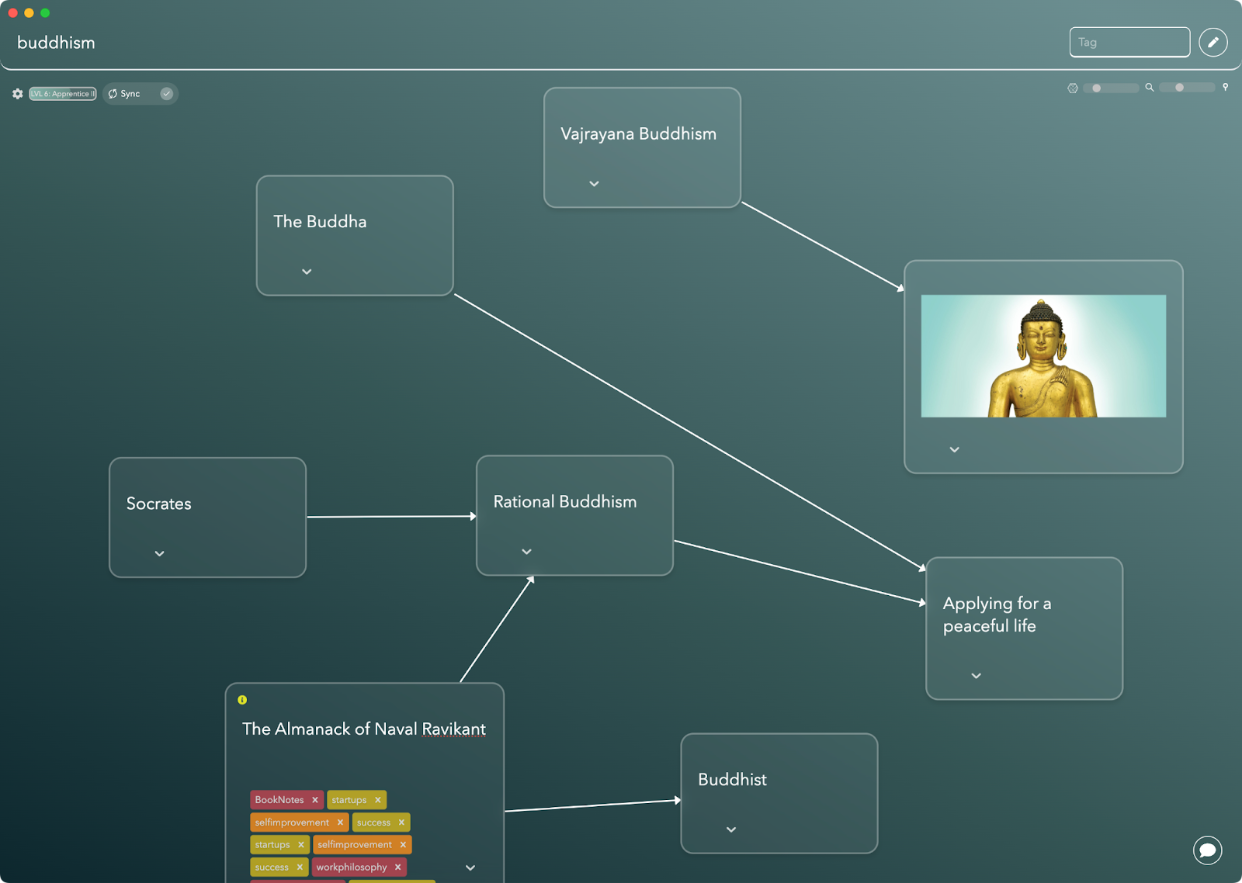
Constella.App shines in personal knowledge management with its friendly AI platform, providing unlimited daily use. Unlike Capacities, which might have some limits, Constella offers unrestricted access, perfect for those who love to interact with their data continuously. This ensures a smooth and enjoyable experience for today's knowledge enthusiasts.
By integrating both Capacities and Constella into your workflow, you can harness the strengths of each platform, creating a comprehensive and dynamic system for managing your knowledge and enhancing productivity.
FAQs (Frequently Asked Questions)
What is Capacities and how does it fit into personal knowledge management?
Capacities is a modern note-taking application designed to help users organize their lives effectively. It fits into the broader context of personal knowledge management (PKM) by providing tools that enhance productivity through organized information storage, retrieval, and management.
What unique features does Capacities.io offer compared to other PKM tools?
Capacities.io stands out with its unique features such as collections and tags for improved organization, alongside powerful search functionality that allows users to quickly find information. These features facilitate a more streamlined and efficient note-taking experience.
How does Capacities enhance understanding through visual aids?
Capacities integrates visual diagrams seamlessly into its interface, which enhances understanding and retention of information. Visual aids play a crucial role in supporting users' learning processes by making complex concepts easier to grasp.
How does Capacities compare to popular PKM tools like Notion and Obsidian?
When comparing Capacities with Notion and Obsidian, key aspects such as organizational capabilities, ease of use, and overall user experience are considered. Capacities offers a distinct approach that may cater better to users looking for specific organizational features.
What role does AI play in note-taking within Capacities?
AI technology revolutionizes the note-taking process within applications like Capacities by providing intelligent suggestions, automating repetitive tasks, and enhancing the overall organization of notes. This integration helps users streamline their workflows effectively.
What tips can help users effectively organize information using Capacities.io?
To effectively organize information using Capacities.io, users should adopt best practices such as structuring notes logically, utilizing collections and tags for categorization, and maintaining a clutter-free digital workspace. These strategies maximize the app's potential for efficient information management.
Want more insights like this?
Subscribe to get short productivity tips and useful summaries of new tools every week.
Want more insights like this?
Subscribe to get short productivity tips and useful summaries of new tools every week.


