
In a fast-paced world where inspiration strikes at the most unexpected moments, digital notes are the ultimate tool for creatives. They allow you to capture ideas anytime, anywhere, while keeping your workflow organized and your progress on track. With features like dynamic organization and effortless accessibility, digital note-taking transforms how you create and refine your ideas.

Enter Constella.App, a next-generation tool that redefines note-taking. Its innovative features, like an infinite visual graph and AI-powered knowledge management, let you visualize, connect, and retrieve insights effortlessly. Whether you're brainstorming or organizing your personal knowledge, Constella.App enhances creativity and productivity, making it the perfect companion for your creative journey. Try it today and experience the future of digital creativity!
1. Embrace Effective Digital Note-Taking Methods
Note-taking is more than just jotting down ideas—it’s a powerful tool to bring structure and clarity to your creative process. By adopting effective methods, you can seamlessly capture, organize, and refine your thoughts, boosting both productivity and inspiration. Here’s a look at popular techniques and how they can transform your creative workflow.

Structured Note-Taking Approaches
- The Cornell Method: Divides notes into three sections: Main Notes for key details, Keywords for quick reference, and a Summary for essence. Perfect for organizing complex information and encouraging active engagement through reflection.
- The Outline Method: Uses hierarchical format to organize topics and subtopics. Ideal for logical thinkers who need clear structure and want to emphasize relationships between ideas.
Visual and Freeform Techniques
- Mapping Method: Creates visual webs of interconnected ideas, perfect for visual thinkers. Uses nodes and links to show relationships between concepts, making it ideal for brainstorming and problem-solving.
- Flow Notes Method: Embraces non-linear thinking by allowing free-form capture of ideas as they emerge. Ideal for creative sessions where thoughts need to flow naturally without structural constraints.
From Traditional to Tech-Enhanced Note-Taking
While traditional tools like Apple Notes and Google Docs served well in their time, modern needs call for advanced platforms. AI-powered note-taking apps now offer unmatched flexibility, integrating structured and freeform approaches into customizable systems.
Integrating these note-taking methods into your routine supports not only effective information retention but also inspires innovative thinking. Exploring how different methods resonate with your personal style can transform how you engage with your creative work, setting the stage for enhanced productivity and idea generation.
2. Use Digital Tools for Organization and Accessibility
In today’s fast-paced creative landscape, staying organized and accessing your ideas effortlessly are non-negotiable. Digital tools provide the perfect solution, empowering you to manage, retrieve, and even share information seamlessly. However, choosing the right platform is key—one that aligns with your workflow and enhances your creative potential. Here’s how to pick and maximize these tools for optimal results.

Selecting the Right Digital Tools
The right digital tool is more than just a repository; it’s your creative partner. Look for platforms that offer:
- Robust Tagging and Search Systems: Microsoft OneNote excels here, with its tagging feature allowing you to categorize notes by keyword or theme. This creates a personalized database that’s easy to navigate, saving time when you’re juggling multiple projects.
- Streamlined Accessibility: Evernote is a leader in device synchronization, ensuring your notes are always up-to-date and accessible, no matter where inspiration strikes.
- Effortless Quick Captures: Google Keep shines with its simple interface, perfect for jotting down ideas on the go. It also supports voice memos, photos, and real-time collaboration, making it ideal for team projects or brainstorming sessions.
Advanced Techniques for Creative Efficiency
For those looking to take their note-taking to the next level, consider methodologies like the Zettelkasten** system**, which emphasizes connecting ideas through a network of linked notes. This approach transforms your notes into a living knowledge base, fostering deeper understanding and creativity.
To enhance your workflow further, explore tools like Constella.App, which integrates AI-powered knowledge management with innovative features such as an infinite visual graph. This allows you to map your ideas dynamically, visualize connections, and uncover insights effortlessly.
3. Capture Ideas Quickly with Smart Technology
In today’s digital age, smart pens are changing how we blend the tactile experience of writing with the convenience of digital organization. Tools like Livescribe and Moleskine’s Pen+ Ellipse use Bluetooth and cloud syncing to instantly convert handwritten notes into digital text, making it easier to capture and organize ideas without losing the personal touch of writing by hand.
Constella.App: Quick, Seamless Idea Capture
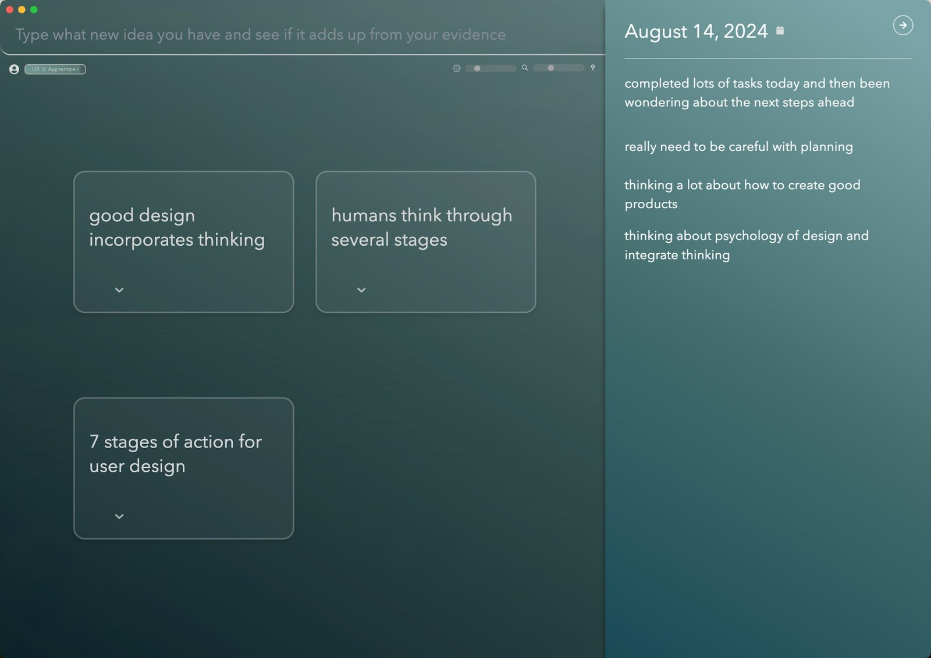
For a fast, user-friendly approach to capturing ideas, Constella.App offers its Quick Jotting View. This feature lets you record thoughts the moment they arise, without needing to navigate through complex menus, so you can stay focused on your creativity.
The power of smart tools like smart pens and Constella.App lies in their ability to keep your ideas at your fingertips. Instant access to notes allows for seamless integration of past thoughts with new ideas, sparking richer, more dynamic creative connections.
- Instant note retrieval: Access previous ideas at a moment’s notice.
- Enhanced idea integration: Easily combine old and new concepts for fresh insights.
- Continuous creative flow: Stay in the zone with quick access to your thoughts.
Empowering Modern Creatives
Incorporating smart technology into your note-taking routine transforms your creative workflow. Whether using a pen that digitizes your writing or an app that adapts to your pace, these tools ensure no idea slips through the cracks.
4. Organize, Review, and Visualize Your Notes
The creative process thrives on consistent reflection. Scheduling regular review sessions allows you to revisit past notes, reinforcing your understanding and sparking new insights. These sessions are opportunities to build upon earlier ideas, uncover hidden patterns, and refine concepts. Digital tools equipped with reminders can help you stay consistent with your review routine, ensuring nothing is forgotten.

- Reinforce understanding: Strengthen the foundation of your ideas.
- Uncover hidden patterns: Identify connections you might have missed.
- Build a habit: Regular reviews nurture creativity and innovation.
Incorporate Visual Elements to Stimulate Creativity
Visual elements are powerful for transforming basic notes into dynamic, engaging resources. Adding charts, mind maps, or sketches can make your ideas more memorable and accessible. Tools with built-in drawing or image integration features allow you to enhance your notes, making them vibrant and visually stimulating.
- Use mind maps and charts: Organize thoughts visually for clarity.
- Incorporate sketches: Bring a personal, creative touch to your notes.
- Turn text into visuals: Make concepts easier to grasp and remember.
"A picture is worth a thousand words"—and in your notes, it can spark a thousand ideas.
Constella.App’s Innovative Visual Graphs
Allow yourself to explore Constella.App’s unique visual graph structure that lets you see connections between different pieces of information effortlessly. This feature not only aids in organizing thoughts but also provides a unique perspective on how your ideas interlink, fostering creativity through visualization.
By adopting these strategies and utilizing technology effectively, you can transform your digital note-taking from mere documentation to an interactive platform that actively fuels your creativity and innovation.
5. The Future of Digital Note-Taking: Constella.App's Innovative Features
Constella.App is redefining digital note-taking with its groundbreaking features designed to enhance organization, creativity, and productivity. By focusing on dynamic visualization, intuitive design, and AI-driven functionality, it offers a seamless and innovative note-taking experience.
Infinite Graph Structure for Dynamic Organization
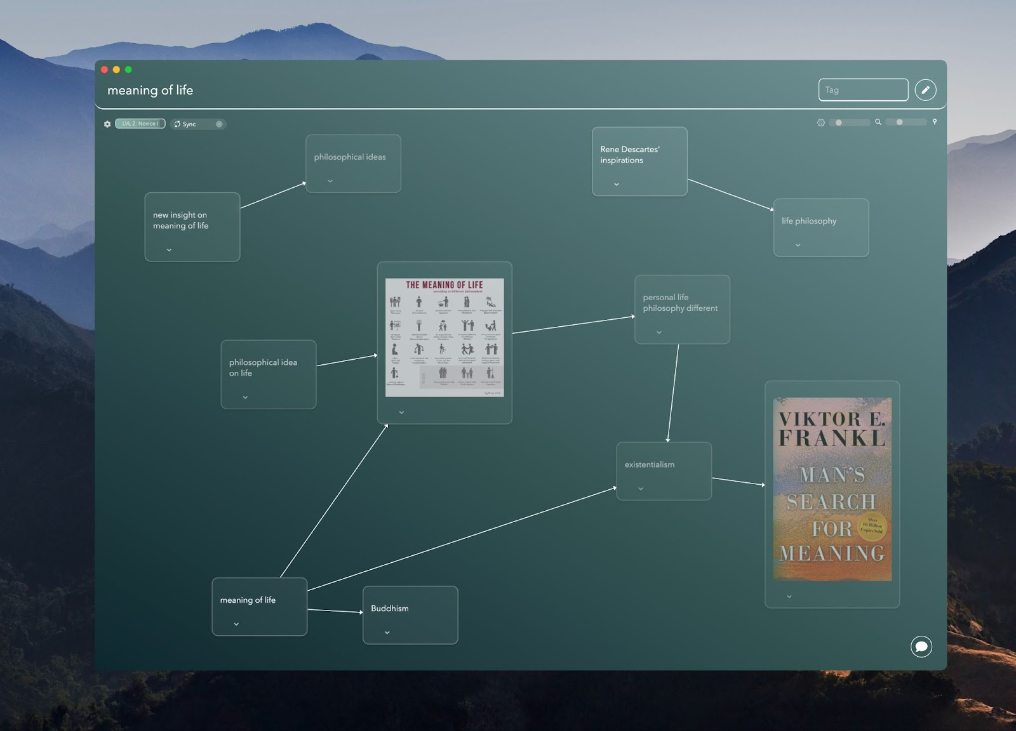
At the heart of Constella.App is its infinite graph structure, a game-changing feature that empowers users to organize and visualize ideas in a fluid, non-linear format. Unlike traditional hierarchical systems, this approach mirrors how our minds naturally connect ideas, encouraging creativity and fostering a more holistic thought process.
- Flexible arrangement: Break free from rigid outlines.
- Natural flow: Connect ideas intuitively for a broader perspective.
- Visual clarity: See relationships between concepts at a glance.
Intelligent Recall System: Effortless Idea Retrieval
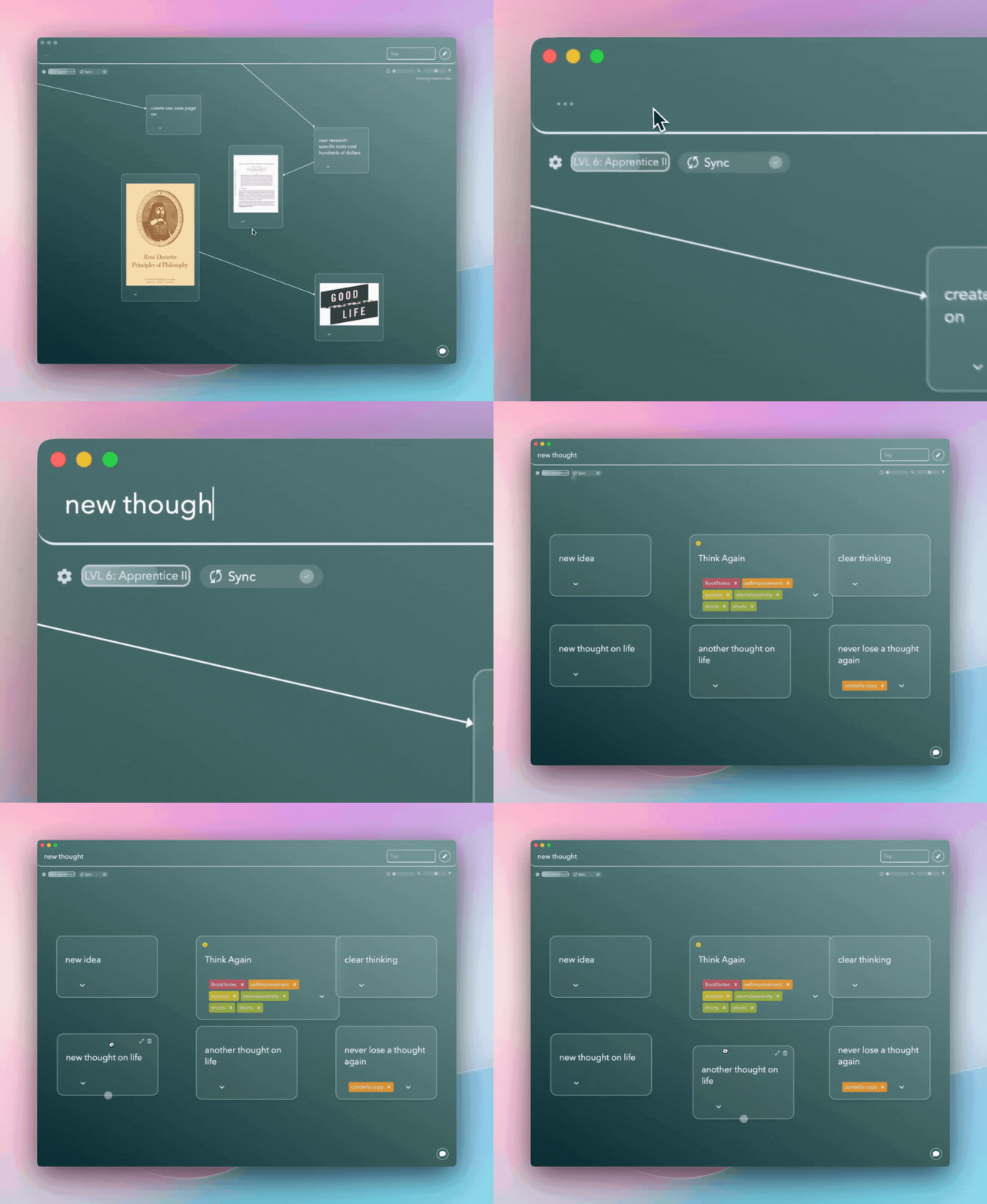
One of Constella.App’s standout features is its intelligent recall system, which takes note retrieval to a whole new level. By analyzing user activity and context, it suggests related notes, ensuring that no insight is ever lost.
- Context-aware suggestions: Retrieve notes tailored to your current task.
- Time-saving automation: Avoid hunting through your database for ideas.
- Creative inspiration: Revisit older notes that add value to new projects.
Additional Features for Enhanced Productivity
Constella.App goes beyond basic note-taking with extra functionalities designed to boost productivity:
- Powerful text search: Quickly locate specific information.
- Seamless import/export: Transfer your notes effortlessly between platforms.
- Stella Chat: An AI assistant for real-time support and idea generation.
A New Standard in Digital Note-Taking
Constella.App isn’t just a tool—it’s a creative partner. Its innovative features help users organize thoughts dynamically, visualize ideas meaningfully, and retrieve information effortlessly. Whether you’re brainstorming a new project or managing personal knowledge, Constella.App adapts to your needs, making it easier to stay organized and inspired.
Exploring these features reveals how Constella.App is reshaping the landscape of digital note-taking, making it an indispensable tool for creatives seeking innovative ways to capture and refine their ideas. Not only does it serve as an effective note-taking assistant, but it also plays a significant role in helping users gain control over their life by tracking what's going on with its AI-powered capabilities.
Conclusion
Harness the Power of Digital Notes to elevate your creative process. By implementing these 5 powerful tips, you can effectively track, organize, and refine your ideas.
- Digital note-taking advantages are numerous, offering flexibility, accessibility, and a structured approach to creativity.
- Constella.App stands out as a next-generation tool with its infinite graph structure and intelligent recall system, making it an invaluable asset for any creative professional.
Consider integrating these strategies into your workflow to experience a transformative shift in how you capture and develop your ideas. Embrace the tools that not only support but actively enhance your creative journey.
FAQs (Frequently Asked Questions)
What are some effective digital note-taking methods?
There are several effective note-taking methods, including the Cornell Method, Outline Method, Mapping Method, and Flow Notes Method. Each of these structured approaches can enhance your ability to capture and organize information effectively, supporting brainstorming and ideation.
Why is it important to choose the right digital tools for note-taking?
Choosing the right digital tools for note-taking is crucial for organization and accessibility. Tools like Microsoft OneNote offer features such as a tagging system that helps in organizing notes, while platforms like Evernote and Google Keep enhance accessibility and collaboration among users.
How can smart technology aid in capturing ideas quickly?
Smart technology, such as smart pens and applications like Constella.App, allows you to capture handwritten notes digitally. The quick jotting view feature in Constella.App enables fast idea capture, ensuring that you can access your notes instantly, which is vital during brainstorming sessions.
What strategies can improve memory retention when reviewing notes?
To improve memory retention when reviewing notes, it's essential to organize your notes effectively and engage in regular review sessions. Incorporating visual elements into your digital notes can also stimulate creativity and aid in active learning.
What innovative features does Constella.App offer for digital note-taking?
Constella.App features an infinite graph structure that provides a unique approach to note-taking. Its beautiful visual graph enhances the creative process by allowing users to see connections between ideas clearly, while its intelligent recall system facilitates easy access to previously captured information.
How can digital note-taking enhance my creative process?
Digital note-taking enhances your creative process by allowing you to capture ideas efficiently, organize thoughts systematically, and visualize connections between concepts. Utilizing tools like Constella.App can further support your creativity through innovative features designed for optimal idea management.
Want more insights like this?
Subscribe to get short productivity tips and useful summaries of new tools every week.
Want more insights like this?
Subscribe to get short productivity tips and useful summaries of new tools every week.


